
When people think about building a home server, they often picture loud, bulky 2U rackmount servers or expensive custom tower builds pulling 100+ watts from the wall.
Last year, I decided to take a much simpler and more budget-conscious path: I picked up a refurbished HP EliteDesk 800 G2 Mini PC.
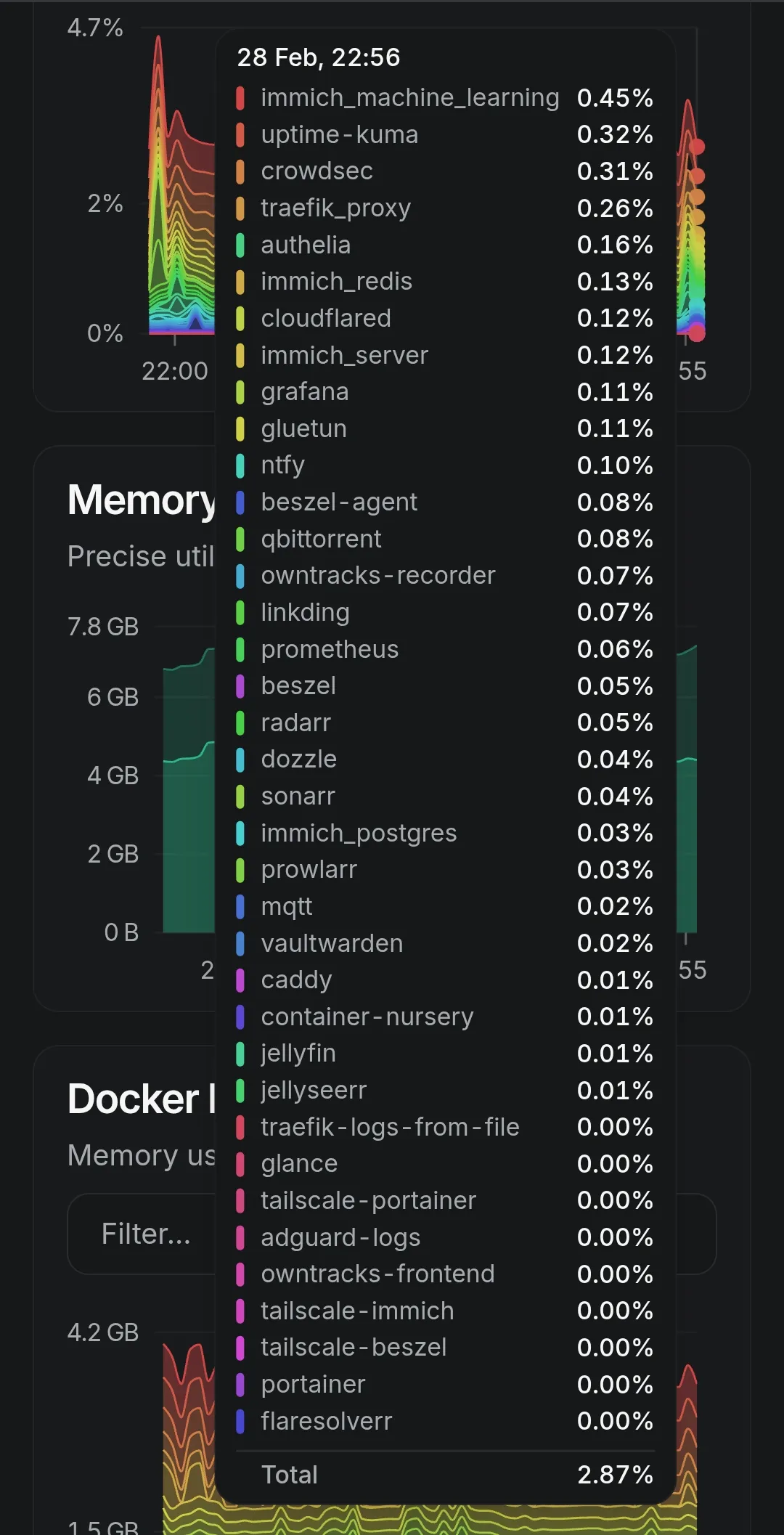
What started as a simple experiment to get my photo library off scattered external hard drives quickly grew into my primary self-hosting machine. Today, this tiny, whisper-quiet box runs over 35 Docker containers around the clock, drawing barely 10 to 15 watts of power, and handling everything from photo management and media streaming to automated DNS filtering, team wikis, and encrypted backups.
Here is a complete breakdown of the hardware, the operating system choices, the storage tiering strategy, and the software stack that makes this little machine punch way above its weight class.
The Hardware: HP EliteDesk 800 G2 Mini
The 1-liter corporate mini PC form factor (HP EliteDesk, Dell OptiPlex Micro, Lenovo Tiny) is the sweet spot for budget homelabbing. Enterprise offices decommission thousands of these units each year, meaning you can easily find them on eBay or local refurbished markets for a fraction of their original cost.
Machine Specs:
| Component | Specification | Role in the Homelab |
|---|---|---|
| Model | HP EliteDesk 800 G2 Desktop Mini | 1L compact chassis |
| Processor | Intel Core i5 (6th Gen, 35W TDP) | Low idle draw & Intel QuickSync support |
| Memory | 8GB DDR4 RAM | Tuned container memory limits |
| Fast Storage | 256GB NVMe M.2 SSD | OS root, Docker engine, Redis & databases |
| Bulk Storage | 256GB 2.5“ SATA HDD | Media files, staging cache & local snapshots |
| Networking | Gigabit Ethernet (Intel I219-LM) | Low-latency gigabit LAN connection |
| Idle Power | ~10W – 14W | Quiet, 24/7 always-on power efficiency |
Operating System & Base Architecture: Debian 13 + Docker
For the operating system, stability and low overhead were my top priorities. I opted for Debian 13 (Trixie) minimal server install without a graphical desktop environment.
A headless Debian installation consumes less than 150MB of RAM at idle, leaving virtually the entire 8GB memory pool available for Docker workloads.
Container Orchestration
Instead of running a complex Kubernetes cluster that consumes several gigabytes of overhead, all services are managed centrally using Docker Compose located in ~/server/docker-compose.yml.
~/server/
├── docker-compose.yml   # Master service orchestrator
├── .env                 # Secret tokens, API keys, and environment variables
├── data/                # Persistent container configuration mounts
└── backups/             # Rclone staging directories and database dumps
Organizing services in a centralized Compose tree with named Docker bridge networks makes service discovery straightforward and keeps container interconnects isolated from outside networks.
The Core Services Breakdown
Running 35+ containers on 8GB of memory requires selecting lightweight, high-performance tools. Here are the core pillars of my setup:
1. Privacy & Network-Wide Protection: AdGuard Home
AdGuard Home acts as the primary DNS resolver for every device on my home network.
- Blocks telemetry, intrusive ads, and malicious domains before packets even reach phones or laptops.
- Provides local DNS rewrites so internal domains (e.g.
*.home.lab) resolve directly to the Mini PC’s LAN IP without leaving the local network.
2. Replacing Google Photos: Immich
Immich is the centerpiece of my personal data independence.
- Automatically backs up full-resolution photos and videos from mobile phones in the background.
- Provides fast timeline scrolling, face recognition, and object search powered by local machine-learning models without sending personal photos to big tech servers.
3. Media Streaming: Jellyfin
- Open-source, subscription-free media server.
- Streams personal movies, home videos, and music to smart TVs and mobile apps with hardware-accelerated playback.
4. Knowledge Base & Notes: Outline Wiki
- Outline Wiki provides a fast, Markdown-first internal wiki.
- Backed by PostgreSQL and Redis, it houses all my infrastructure notes, homelab runbooks, and project documentation.
5. Observability & Log Streaming: Beszel + Dozzle
- Monitoring with Beszel and Dozzle gives me real-time infrastructure visibility without memory bloat.
- Beszel: Super-lightweight system metrics daemon tracking CPU load, RAM utilization, disk health, and network traffic.
- Dozzle: Fast web interface for real-time log streaming across all 35+ containers without needing heavy ELK/Grafana stacks.
6. Security Gateway: CrowdSec + Traefik v3
- Securing with CrowdSec and Traefik keeps my self-hosted services safe from automated scanners.
- Traefik: Reverse proxy handling automatic Let’s Encrypt SSL certificates and internal routing.
- CrowdSec: Modern intrusion prevention system (IPS) analyzing access logs in real time, automatically banning malicious bots and brute-force attempts at the gateway.
Remote Access Without Port Forwarding
One of the biggest security risks in self-hosting is opening ports (like 80 or 443) on your home router. My setup uses a Zero Open Ports strategy combining Tailscale and Cloudflare Tunnels:
[ Remote Client ]
       │
       ├──► Tailscale VPN (Private Mesh) ──► Direct SSH / Admin Dashboards (AdGuard, Dozzle)
       │
└──► Cloudflare Zero Trust Tunnel ──► Authenticated Public Ingress (Immich, Outline)- Tailscale (Private Mesh Network):
- Creates an encrypted WireGuard-based mesh between my laptop, phone, and the Mini PC.
- Gives secure, instant access to SSH, database terminals, and sensitive management dashboards from anywhere in the world without exposing them to the internet.
- Cloudflare Tunnels (Encrypted Ingress):
- For services that need public webhooks or mobile sync (like Immich or Outline), Cloudflare’s lightweight
cloudflareddaemon creates an outbound encrypted tunnel to Cloudflare’s edge network. - Protects the origin home IP and applies Cloudflare Zero Trust authentication rules.
- For services that need public webhooks or mobile sync (like Immich or Outline), Cloudflare’s lightweight
Automated Cloud Backup Pipeline with Rclone
A server without backups is just data waiting to be lost. My backup strategy follows the 3-2-1 principle using Rclone:
- Daily Automated Snapshots: A cron job runs nightly to trigger
pg_dumpand SQLite backups for databases (Immich, Outline, AdGuard). - Encrypted Cloud Sync: Rclone reads the backup dumps, encrypts them client-side with an AES-256 encryption key, and synchronizes them directly to offsite cloud storage.
- Bandwidth Optimization: Rclone only uploads changed deltas, keeping network transfer fast and reliable.
# Example nightly backup routine via crontab
0 3 * * * ~/server/scripts/backup-databases.sh && rclone sync ~/server/backups remote-crypt:homelab-backups --fast-list
How to Run 35+ Containers on 8GB of RAM
People are often surprised that 8GB of RAM can sustain this many services. Here are the key configuration tweaks that make it possible:
- Container Memory Limits: Always set
mem_limitconstraints indocker-compose.ymlon non-critical containers to prevent memory leaks from taking down the host. - Tuned Swappiness: Set
vm.swappiness=10in/etc/sysctl.confso Linux prefers caching in physical RAM and only uses disk swap during peak spikes. - Disable Unused Microservices: For apps like Immich, schedule heavy machine-learning indexing tasks during off-peak night hours rather than running continuous real-time transcode workers.
Summary & What’s Next
Building this homelab on an HP EliteDesk Mini has completely transformed my workflow. For less than the annual cost of multiple cloud subscriptions, I have a dedicated, private, and silent system that I control completely.
In upcoming guides in this Homelab Series, I will share step-by-step configuration templates and compose recipes for each of these services: