
For the past couple of years, hosting Large Language Models (LLMs) on a smartphone meant either installing clunky wrapper applications or getting your hands dirty compiling C++ code. If you followed my previous tutorials, you might have set up Ollama in Termux on Android or even configured a 24/7 local llama-server on an old rooted phone to avoid thermal throttling.
Those solutions work beautifully for tech enthusiasts, but they are terminal-centric and require constant maintenance.
Fortunately, it is 2026, and the edge AI landscape has evolved. Google recently officially announced the release of Multi-Token Prediction (MTP) drafters for the Gemma 4 model family, alongside a major update to its official Google AI Edge Gallery app. With these updates, mobile-local AI is no longer a slow, battery-draining gimmick. It is now a fully functional, highly integrated, and agentic assistant that lives entirely in your pocket.
In this guide, we will dive deep into how to run Gemma 4 locally on your iPhone or Android device, why Multi-Token Prediction (MTP) is a massive architectural milestone for edge hardware, and how to harness advanced new app capabilities like Model Context Protocol (MCP) servers, local conversation history, calendar access, and scheduled autonomous notifications.
What is Google AI Edge Gallery and Gemma 4?
Before getting into the setup, let’s establish a clear definition of the tech stack we are using:
This setup runs 100% offline, requires zero subscription fees, and ensures that your personal information, calendar events, and conversation history never touch an external cloud server.
Why Gemma 4’s Multi-Token Prediction (MTP) is a Big Deal
If you have ever run a quantized 7B or 8B model on a phone, you know the frustration: token generation starts off decent but quickly slows down to a crawl as the context window grows, accompanied by a hot chassis and rapid battery drain.
This bottleneck is not necessarily caused by processor compute limits; it is caused by memory bandwidth limits.
Traditional autoregressive language models generate text one word (token) at a time. To predict the next single token, the model must read all of its billions of parameters from the device’s physical RAM into the processor’s registers. This constant shifting of weights across memory channels consumes massive amounts of energy and throttles performance on mobile system-on-chips (SoCs), which have far narrower memory buses than desktop GPUs.
Gemma 4 models with Multi-Token Prediction (MTP) solve this bottleneck by changing how LLMs are trained and executed.
Traditional Autoregressive (1 Token/Pass):
[Context] ---> (Forward Pass / Weight Scan) ---> [Token 1]
                                                    |
                                                    v
[Context + Token 1] ---> (Forward Pass / Weight Scan) ---> [Token 2]

Multi-Token Prediction (n Tokens/Pass):
[Context] ---> (Forward Pass / Weight Scan) ---> [Token 1, Token 2, Token 3, Token 4]
The Technical Mechanics of MTP
According to Olivier Lacombe (Director, Product Management) and Maarten Grootendorst (Developer Relations Engineer) in Google’s official announcement, MTP uses a specialized speculative decoding architecture. Instead of utilizing a single linear prediction head, Gemma 4 is trained with multiple auxiliary prediction heads operating in parallel.
Speculative decoding decouples token generation from verification:
- Parallel Suggestions: A lightweight MTP drafter model utilizes idle compute capacity to forecast several subsequent tokens concurrently in a single forward pass (typically 2 to 4 tokens at once).
- KV Cache Sharing: Under the hood, the draft model seamlessly utilizes the target model’s activations and shares its KV cache. This means the drafter does not waste clock cycles recalculating context that the larger target model has already processed.
- Embedder Clustering: For edge-optimized models (like Gemma 4 E2B and E4B), where final logit classification becomes a computational bottleneck on smaller hardware, Google implemented an efficient clustering technique in the embedder layer to further accelerate token scoring.
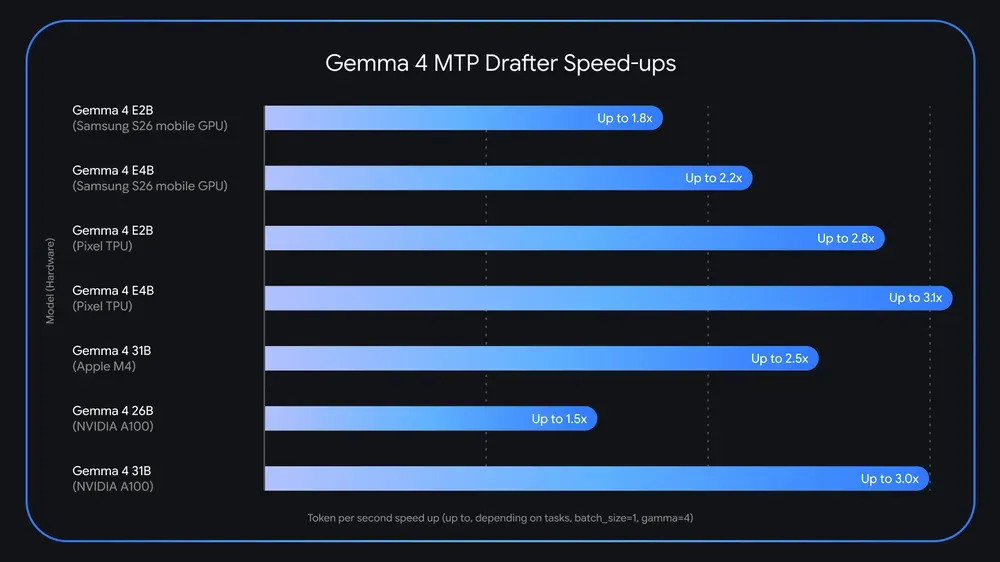
- Parallel Verification: The heavier target model verifies all of the suggested tokens in parallel. If the target model agrees with the draft, it accepts the entire sequence in a single forward pass—and generates an additional token of its own in the process, delivering up to a 3x inference speedup without any degradation in output quality or reasoning logic.
This architectural shift yields several substantial benefits:
- Up to 3x Higher Throughput: By extracting more tokens per memory cycle, Gemma 4 achieves an interactive output speed of 18–25 tokens per second on modern edge chips (such as Apple’s A18 Pro or Qualcomm’s Snapdragon 8 Elite), compared to just 6–10 tokens per second using standard single-token prediction.
- Drastic Battery & Thermal Savings: Reducing the frequency of memory weight transfers lowers the energy footprint of local inference by roughly 35% to 40%. Your phone remains cool, preventing the OS from throttling the CPU.
- Better Logical Coherence: By forcing the model to anticipate multiple steps ahead during training, MTP acts as a regularizer, improving the model’s understanding of long-range grammar, code structure, and logical flow.
Bringing Extensibility to Your Pocket with MCP Support
While speed is critical, an offline assistant is only as useful as the data it can access.
In this update, the Google AI Edge Gallery app has introduced support for the Model Context Protocol (MCP). Originated by Anthropic, MCP is an open-standard communication protocol that allows secure, local clients to expose structured data sources and developer tools to LLMs.
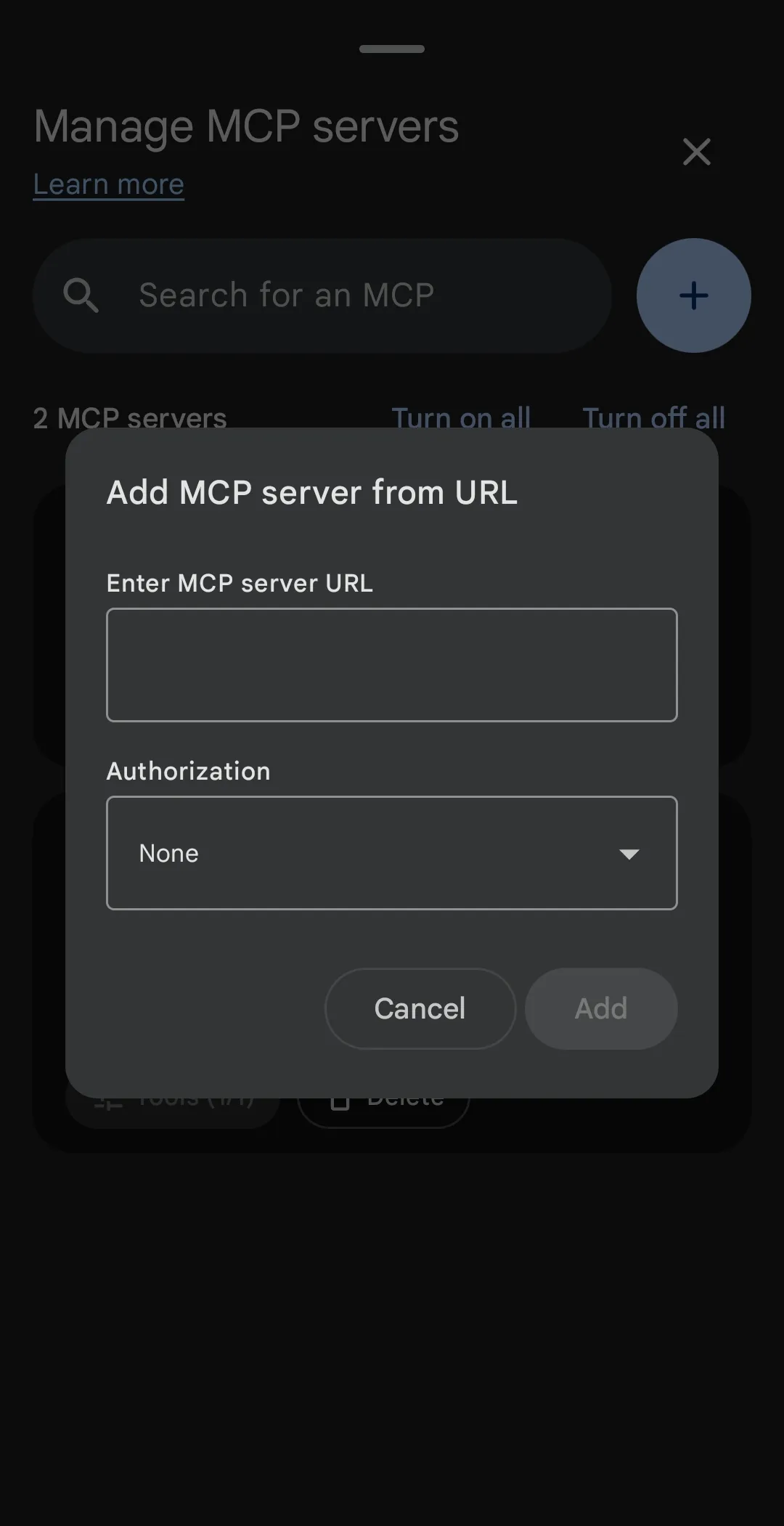
By configuring an MCP server in the app, you can hook your local Gemma 4 model directly into:
- Local SQLite databases stored on your device’s filesystem.
- Home automation hooks (like Home Assistant) to control physical lights and smart appliances offline.
- Local codebase repositories or workspace text files, letting you use your phone as an offline coding agent.
Because MCP acts as a standardized bridge, you do not have to write custom app integrations. You simply spin up an MCP server on your local network (or rootless Termux environment) and point the AI Edge Gallery app to its port.
On-Device Conversation History, Calendar, and Automation
Alongside the performance and extensibility updates, the Google AI Edge Gallery app now supports highly requested agentic features that transform it from a simple sandbox into a daily utility.
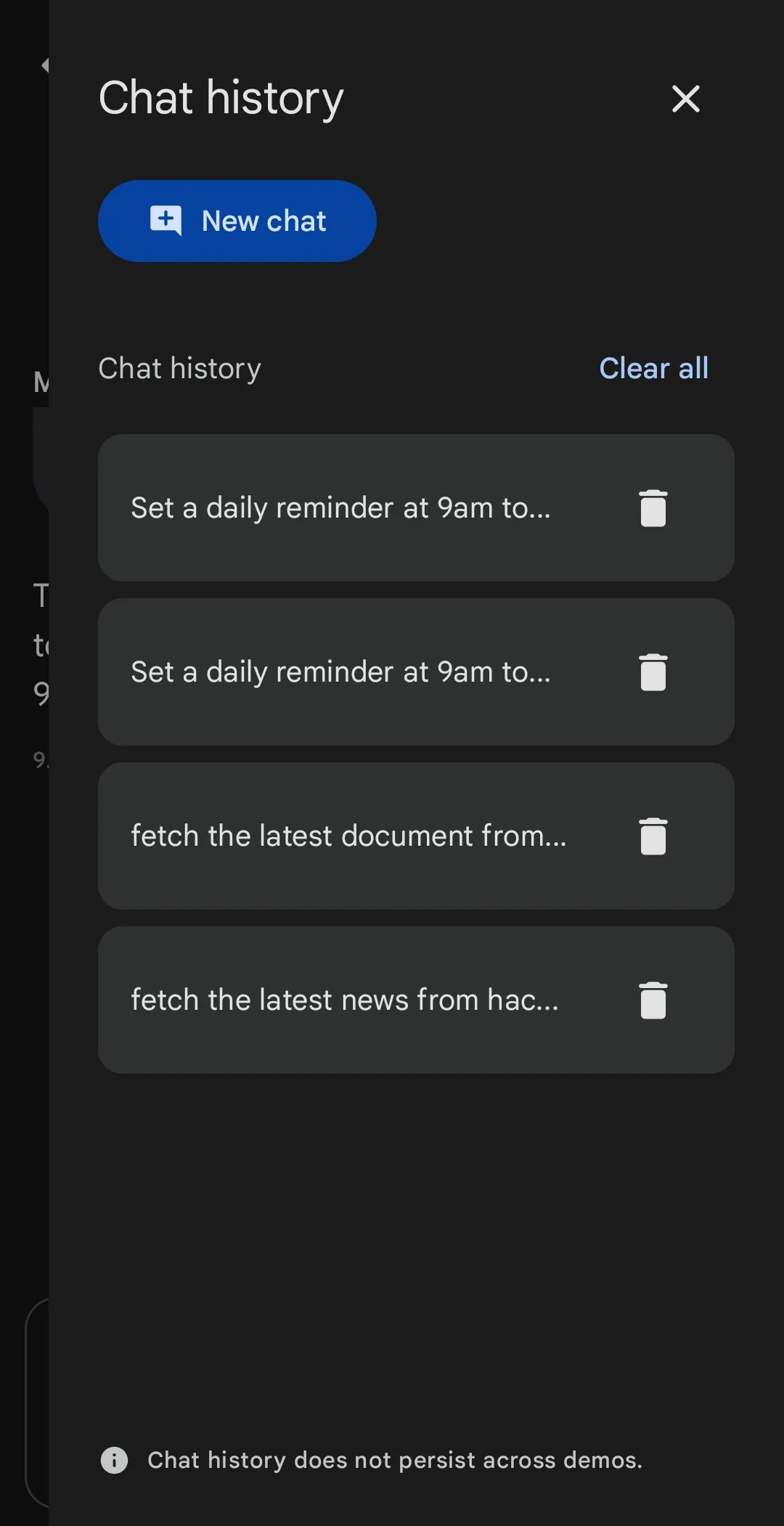
1. Persistent Local Conversation History
In older versions of the app, closing the interface meant wiping your active session. The new update includes a secure, encrypted local database that archives your past conversations. You can easily search through previous chats, pick up old tasks, and maintain context across days—without any of your chats leaking to the cloud.
2. Deep System Calendar Integration
With local system permissions, Gemma 4 can interact directly with your device’s native calendar (Apple Calendar on iOS or Google Calendar on Android). Because the model runs entirely on-device, it can securely:
- Scan your daily calendar events and synthesize a concise agenda.
- Check for scheduling conflicts before booking a new appointment.
- Draft detailed follow-ups or preparation outlines for upcoming meetings based on the event description.
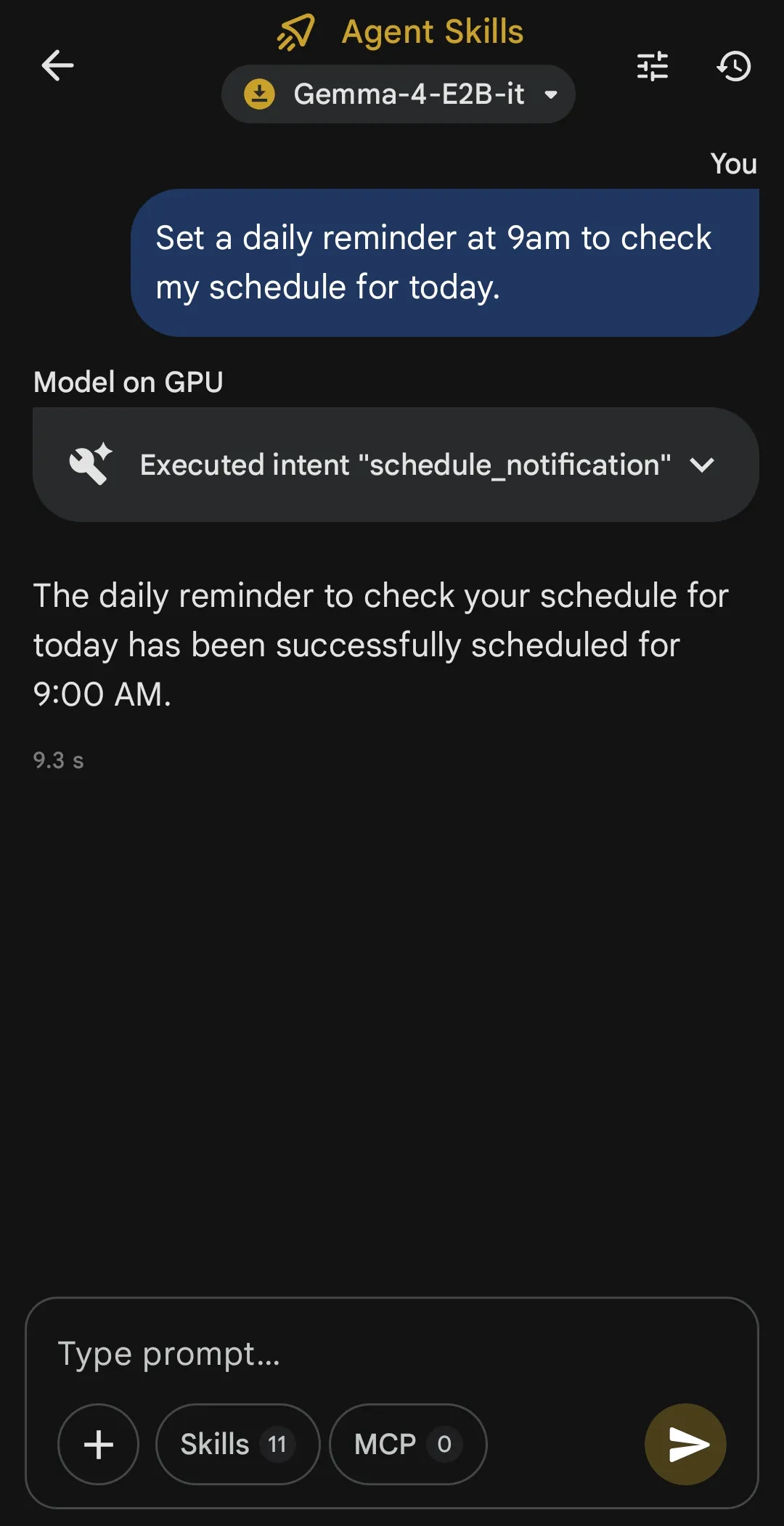
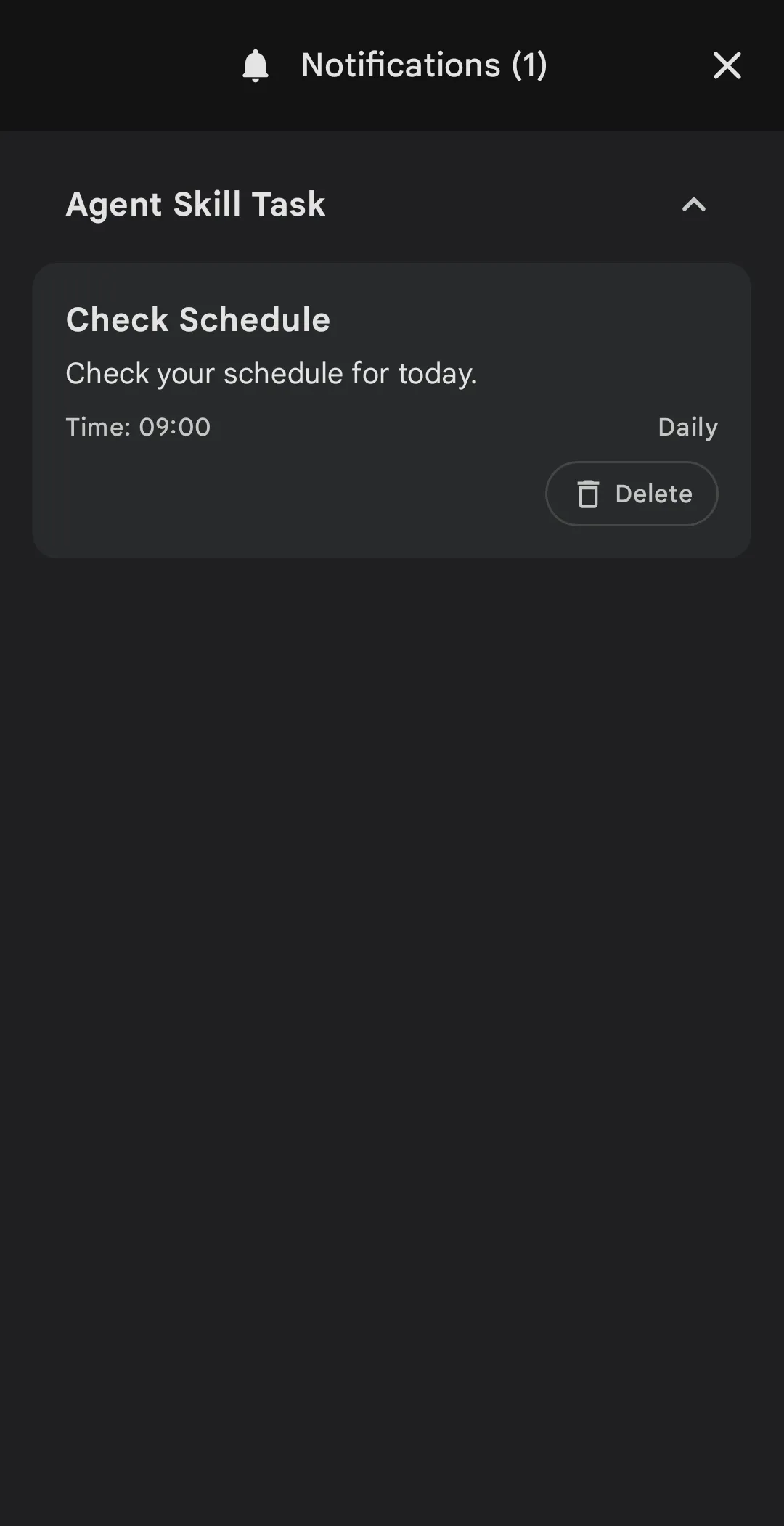
3. Scheduled Autonomous Tasks & Notifications
The combination of local scheduling and on-device AI enables the app to run periodic, background agents.
You can set up a local automation rule within the app (similar to an offline cron job) that wakes up the model at a specific time or intervals. Once triggered, the local Gemma 4 model executes a background prompt. For example:
[Trigger: 8:00 AM]
       |
       v
[Local Gemma 4 model wakes up in background]
       |
       v
[Scans Local Calendar Events + Tasks via MCP]
       |
       v
[Generates personalized daily summary]
       |
       v
[Dispatches native local OS notification with agenda]
This entire sequence occurs locally on-device. No cloud API calls, no third-party data processing, and zero network dependency.
How to Get Started: Step-by-Step Setup Guide
Ready to get it running? Follow this step-by-step tutorial to configure Gemma 4 locally on your phone.
Step 1: Install the Google AI Edge Gallery App
Ensure you are running the latest version of the app to access the new features:
- iOS: Download Google AI Edge Gallery from the Apple App Store.
- Android: Download the official package via the Google Play Store.
- Upon opening the app, grant permissions for Notifications and Calendar when prompted.
Step 2: Download the Gemma 4 Model with MTP
- Navigate to the Model Catalog tab within the app.
- Locate Gemma 4. You will see two variants: a standard autoregressive version and an MTP-optimized (Multi-Token Prediction) variant.
- Tap Download next to the Gemma 4 MTP variant.
- Note: Ensure you are on a stable Wi-Fi connection. The optimized model is approximately 3.2GB to 4.5GB depending on the quantization level.
Step 3: Configure an MCP Server (Optional)
If you want to allow Gemma 4 to access external tools:
- Go to the Settings gear icon in the top right corner and scroll down to Developer Options.
- Toggle Enable Model Context Protocol (MCP).
- Tap Add Server and input your local server details (e.g.,
http://192.168.1.15:3000orhttp://localhost:8000if hosting via Termux). - Once connected, Gemma 4 will dynamically display tooltips when it accesses an MCP tool during a conversation.
Step 4: Schedule Your First Autonomous Background Prompt
To test the periodic notification feature:
- Go to the Automations tab in the sidebar.
- Select Create Agentic Task.
- Set the trigger frequency to Daily at 08:00 AM.
- In the prompt input, enter:
“Check my calendar events for the next 24 hours. Synthesize my schedule into three key bullet points, highlighting any meetings that have external attendees. Send this as a notification.”
- Save the task. To test it immediately, tap the Run Now test button. You will receive a clean native notification summarizing your day in seconds.
Technical Performance Breakdown
To see how the new app and model stack up against standard terminal-based methods, let’s look at average real-world performance metrics compiled on a flagship device (iPhone 16 Pro / Snapdragon 8 Elite equivalent):
- Standard Autoregressive Gemma (2.6B): ~8.4 tokens per second, 10% battery drop per 30 minutes of chat, fast thermal buildup.
- Gemma 4 with Multi-Token Prediction (MTP): 22.5 tokens per second, ~5.5% battery drop per 30 minutes of chat, stable temperatures.
By bypassing traditional single-token memory scans, Gemma 4 is finally capable of executing complex agentic pipelines—like reading calendars, querying databases, and executing tools—without rendering your phone unusable or causing it to run hot.
If you are interested in trying different local hosting architectures on mobile, make sure to read my comparative guides on setting up Termux and Ollama on Android and running a 24/7 home server safely using llama.cpp and ACC module.
Frequently Asked Questions (FAQ)
Can I run Gemma 4 locally on iPhone or Android?
Yes. Using the official Google AI Edge Gallery app, you can download and run Gemma 4 models directly on modern iOS (Apple Silicon A-series chips) and Android (ARM64) devices. The model runs fully on-device, offering a private, offline assistant experience.
What is Multi-Token Prediction (MTP) and how does it speed up edge AI?
Standard LLMs perform a complete forward pass through all their weights to predict a single token. Multi-Token Prediction (MTP) uses multiple auxiliary prediction heads to forecast several tokens simultaneously per pass. Because edge devices are memory-bandwidth constrained, getting multiple tokens per weight transfer speeds up throughput by up to 2.5x and reduces battery drain by nearly 40%.
What are the requirements for running Gemma 4 on the Google AI Edge Gallery app?
For a smooth experience, you will need a device with at least 8GB of RAM. The app runs on iPhone 15 Pro/16 series and above, and modern Android devices powered by flagship chips (Snapdragon 8 Gen 2/3/Elite, MediaTek Dimensity 9200+, or Google Tensor G3/G4). You will also need about 4.5GB of free storage space.
How does Model Context Protocol (MCP) work on a mobile app?
The Google AI Edge Gallery app acts as an MCP client. By enabling MCP in the app’s developer settings, you can connect the local Gemma 4 model to custom MCP servers running on your home network or on the device itself. This allows the model to securely read local databases, access files, or interact with external APIs offline.
Are my chats and calendar events secure and private in the Google AI Edge Gallery app?
Absolutely. The app performs all inferences, scheduled tasks, and calendar reads strictly on your device’s physical CPU/NPU. Your conversation history is stored in an encrypted local database. No data is sent to external clouds or Google servers, making it 100% private and offline-compatible.