
Every homelab begins with high optimism and zero documentation. You spin up a few Docker containers, configure a reverse proxy, assign some IP addresses, and assume you will easily remember how everything connects.
Fast forward a few months. A server reboots, a container refuses to start, and you are suddenly scrambling to remember what port was assigned to what service, which database password belongs where, or how you configured that reverse proxy in the first place.
This is the classic homelab “bus factor of one” dilemma. When your notes are scattered across scratchpad text files, disconnected GitHub READMEs, Apple Notes, and random browser bookmarks, you don’t have a reliable setup—you have technical debt waiting to trip you up.
A centralized documentation service is not a luxury; it is the control plane of a reliable homelab.
Here is how I self-host Outline Wiki as the single source of truth for my homelab using Docker Compose, OIDC SSO, built-in Passkeys, reusable operational templates, and a Model Context Protocol (MCP) server that connects my AI coding agents directly to my internal runbooks.
Why Outline Wiki for Homelabs?
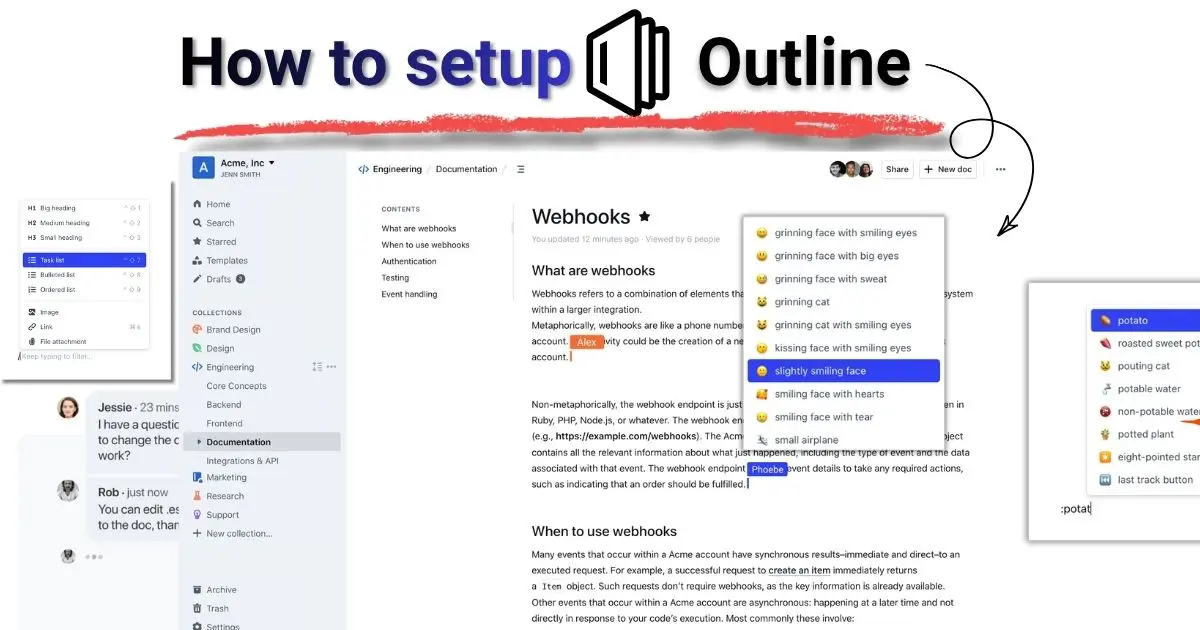
Outline Wiki is an open-source, modern team knowledge base and wiki platform designed for speed, collaboration, and structured markdown documentation. It combines a Notion-style block editor with native markdown support, granular multi-user permissions, OpenID Connect (OIDC) authentication, built-in Passkeys (WebAuthn), and an extensible API.
Unlike legacy wiki engines, Outline feels lightweight, instant, and visually polished.
+-------------------------------------------------------------------------+
|                              OUTLINE WIKI                               |
|                                                                         |
|  +-------------------+  +--------------------------------------------+  |
|  |    Collections    |  |               Document Hub                 |  |
|  | - Network & IPs   |  |  # Traefik Reverse Proxy Runbook           |  |
|  | - Service Stacks  |  |  Last updated: 2026-08-15                  |  |
|  | - Storage & ZFS   |  |                                            |  |
|  | - Disaster Recov. |  |  ```yaml                                   |  |
|  | - ADR Decisions   |  |  services: traefik...                      |  |
|  +-------------------+  +--------------------------------------------+  |
|           ^                                   ^                         |
+-----------|-----------------------------------|-------------------------+
            |                                   |
    [ OIDC Auth / Passkeys ]           [ Outline MCP Server ]
   (Authentik / Keycloak / Local)        (AI Agents: Claude, Cursor, AGY)
Key Capabilities
- Modern Markdown-First Editor: Slash commands (
/table,/code,/callout), collapsible headers, embedded diagrams, and instant real-time sync. - True Multi-User & Access Control: Organize notes into public and private Collections with fine-grained read/write permissions for family members, collaborators, or guest users.
- OpenID Connect (OIDC) Native Support: Integrate seamlessly with your existing self-hosted Identity Provider (IdP) like Authentik, Authelia, Keycloak, or external providers like Google and GitHub.
- Built-in Passkeys (WebAuthn): Native passwordless authentication with hardware security keys (YubiKey), Apple Touch ID, and Windows Hello.
- AI Agent Integration via MCP: Expose your entire documentation library to local and cloud AI assistants (Claude, Cursor, Antigravity) via the Outline Model Context Protocol (MCP) server.
- Reusable Document Templates: Standardize service deployments, incident post-mortems, and Architectural Decision Records (ADRs).
Homelab Wiki Alternatives: How Outline Compares
Choosing a self-hosted wiki often comes down to balancing ease of use with feature depth:
| Feature | Outline Wiki | BookStack | MediaWiki | Obsidian Sync |
|---|---|---|---|---|
| Editing Experience | Notion-like Rich Markdown | WYSIWYG / Markdown split | MediaWiki syntax | Native Markdown files |
| Multi-User Collaboration | Real-time concurrent | Page-level locking | Revision-based | Manual / Git conflicts |
| OIDC / SSO | Native | Native | Plugin required | Third-party sync |
| Passkeys / WebAuthn | Built-in | Limited / IdP dependent | Plugin required | Device OS dependent |
| AI Agent MCP Server | Supported | Custom API only | Limited | Local filesystem only |
| Document Templates | Native | Books / Chapters | Templates via wikitext | Community plugins |
| Resource Footprint | ~200MB RAM | ~150MB RAM | ~300MB RAM | Client-side only |
While BookStack is structured around books and chapters, Outline’s nested collections and real-time multiplayer editing feel much more natural for fast operational lookups.
Infrastructure Architecture & Prerequisites
Before deploying the containers, ensure you have the following prerequisites ready:
- Docker Engine (v24.0+) & Docker Compose (v2.20+)
- A Reverse Proxy (such as Traefik, Caddy, Nginx Proxy Manager, or Cloudflare Tunnels) configured with valid SSL/TLS certificates. Outline strictly requires HTTPS in production.
- An OIDC Provider (Authentik, Keycloak, Authelia, or an OAuth application via Google/GitHub/Discord).
Outline relies on two backend databases:
- PostgreSQL (version 15, 16, 17, or 18) for relational document data, access control, and revision history.
- Redis (or Valkey) for session persistence, pub/sub real-time socket events, and rate limiting.
Generic Docker Compose Deployment
Here is a clean, production-ready docker-compose.yml for self-hosting Outline Wiki. This setup isolates the application, database, and cache containers in a dedicated bridge network while exposing port 3000 to your reverse proxy.
name: outline-stack

services:
  outline:
    container_name: outline
    image: docker.getoutline.com/outlinewiki/outline:1.9.2
    restart: unless-stopped
    env_file:
      - .env
    expose:
      - "3000"
    volumes:
      - outline-storage-data:/var/lib/outline/data
    depends_on:
      outline-postgres:
        condition: service_healthy
      outline-redis:
        condition: service_healthy
    deploy:
      resources:
        limits:
          memory: 1024M
        reservations:
          memory: 256M
    networks:
      - outline-internal
      - proxy-network

  outline-postgres:
    container_name: outline-postgres
    image: postgres:18-alpine
    restart: unless-stopped
    env_file:
      - .env
    environment:
      POSTGRES_USER: ${POSTGRES_USER:-outline}
      POSTGRES_PASSWORD: ${POSTGRES_PASSWORD}
      POSTGRES_DB: ${POSTGRES_DB:-outline}
    volumes:
      - outline-db-data:/var/lib/postgresql/data
    healthcheck:
      test: ["CMD-SHELL", "pg_isready -d $$POSTGRES_DB -U $$POSTGRES_USER"]
      interval: 10s
      timeout: 5s
      retries: 5
    networks:
      - outline-internal

  outline-redis:
    container_name: outline-redis
    image: redis:7-alpine
    restart: unless-stopped
    command: ["redis-server", "--appendonly", "yes"]
    volumes:
      - outline-redis-data:/data
    healthcheck:
      test: ["CMD", "redis-cli", "ping"]
      interval: 10s
      timeout: 5s
      retries: 5
    networks:
      - outline-internal

volumes:
  outline-storage-data:
    name: outline-storage-data
  outline-db-data:
    name: outline-db-data
  outline-redis-data:
    name: outline-redis-data

networks:
  outline-internal:
    internal: true
  proxy-network:
    external: true
[!NOTE] Make sure the
proxy-networkmatches the external Docker network used by your reverse proxy (e.g.,traefik_default,caddy, ornpm_network).
Environment Configuration (.env.example)
Outline requires several 64-character hexadecimal cryptographic keys for token encryption and session signing. Generate them on your host terminal before launching:
# Generate SECRET_KEY
openssl rand -hex 32

# Generate UTILS_SECRET
openssl rand -hex 32
Create a .env file next to your docker-compose.yml and populate it with the following configuration:
# ==========================================
# Outline Core Configuration
# ==========================================
NODE_ENV=production
URL=https://docs.yourhomelab.net
PORT=3000

# Cryptographic Keys (Generated with `openssl rand -hex 32`)
SECRET_KEY=replace_with_generated_64_char_hex_key_01
UTILS_SECRET=replace_with_generated_64_char_hex_key_02

# ==========================================
# Database & Redis Settings
# ==========================================
POSTGRES_USER=outline_user
POSTGRES_PASSWORD=generate_a_secure_postgres_password_here
POSTGRES_DB=outline_db
DATABASE_URL=postgres://outline_user:generate_a_secure_postgres_password_here@outline-postgres:5432/outline_db

REDIS_URL=redis://outline-redis:6379

# ==========================================
# File Storage (Local disk storage)
# ==========================================
FILE_STORAGE=local
FILE_STORAGE_LOCAL_ROOT_DIR=/var/lib/outline/data
FILE_STORAGE_UPLOAD_MAX_SIZE=262144000

# ==========================================
# Authentication (Generic OpenID Connect / OIDC)
# ==========================================
# Works out of the box with Authentik, Keycloak, Authelia, or Okta
OIDC_CLIENT_ID=outline_client_id
OIDC_CLIENT_SECRET=outline_client_secret
OIDC_AUTH_URI=https://auth.yourhomelab.net/application/o/authorize/
OIDC_TOKEN_URI=https://auth.yourhomelab.net/application/o/token/
OIDC_USERINFO_URI=https://auth.yourhomelab.net/application/o/userinfo/
OIDC_USERNAME_CLAIM=preferred_username
OIDC_DISPLAY_NAME="Homelab Single Sign-On"
OIDC_SCOPES="openid profile email"

# Optional: Disable non-essential telemetry
TELEMETRY=false
Authentication: OIDC SSO and Built-In Passkeys
Outline does not rely on a traditional local username/password database. Instead, it delegates authentication to modern, secure protocols like OpenID Connect (OIDC).
One of the biggest reasons I love Outline is how seamless this integration is. I have it connected directly with my Authelia instance, meaning I never have to remember or manage separate wiki passwords. While several popular open-source platforms have unfortunately pushed SSO and OIDC behind expensive enterprise paywalls (the infamous “SSO tax”), Outline keeps OIDC completely free, open, and unrestricted in its self-hosted edition.
[ User Browser ]
      |
      | 1. Navigate to Outline (https://docs.yourhomelab.net)
      v
[ Outline Login ] ----> Redirects to OIDC (Authelia / Authentik / Keycloak)
      |                                |
      |<--- Validated JWT ID Token ----+
      |
      | 2. Register WebAuthn / Passkey in Outline Account Settings
      v
[ Passwordless Passkey Login Active ] (Apple Touch ID, YubiKey, Windows Hello)
1. Setting up OIDC in your Identity Provider (e.g. Authelia or Authentik)
- In your IdP (like Authelia or Authentik), register an OpenID Connect client for Outline.
- Set the Redirect URI to:
https://docs.yourhomelab.net/auth/oidc.callback - Ensure the
openid,email, andprofilescopes are granted. - Copy the Client ID, Client Secret, and issuer endpoints into your
.envfile (OIDC_CLIENT_ID,OIDC_CLIENT_SECRET, etc.).
2. Enabling Built-in Passkeys (WebAuthn)
Once you complete your initial login via OIDC:
- Navigate to Settings > Account > Passkeys.
- Click Add Passkey.
- Authenticate with your platform authenticator (Apple Touch ID, Android biometrics, Windows Hello, or a hardware YubiKey).
- For subsequent logins, you can authenticate instantly with biometric hardware without having to re-authenticate upstream every single time.
Supercharging Your Homelab with AI Agents (Native Outline MCP)
One of the absolute game-changers of self-hosting Outline is its native support for the Model Context Protocol (MCP).
Outline provides a built-in MCP server endpoint out of the box. This allows AI assistants—such as Antigravity IDE, Claude Desktop, Cursor, or Cline—to directly search, read, reference, and even draft documentation in your knowledge base.
+-------------------+       MCP over HTTP       +-------------------------+
|   AI Assistant    | <=======================> |  Self-Hosted Outline    |
| (Claude / Cursor) |   https://docs.../mcp     |   (Built-in MCP Server) |
+-------------------+                           +-------------------------+
What AI Agents Can Do With Outline MCP
- Query Network Topologies: “What IP is assigned to my TrueNAS backup interface?”
- Retrieve Service Runbooks: “Find the recovery procedure for my Vaultwarden container.”
- Draft Architecture Decision Records: Ask your AI coding assistant to document decisions made during a session and save them directly to your ADR collection.
- Verify Configuration Details: Have the AI check your existing compose files against your documented port allocations before deploying a new stack.
Configuring Outline MCP in your AI Client
Connecting your AI client to Outline is remarkably straightforward. Add the native /mcp URL to your client’s MCP configuration (e.g., in .agents/mcp_config.json or your AI editor settings):
{
  "mcpServers": {
    "outline": {
      "url": "https://<your outline server>/mcp"
    }
  }
}
Because Outline exposes the MCP protocol natively at /mcp, you don’t need complicated external wrapper daemons. Your AI coding assistants immediately gain real-time, context-aware access to all your homelab documentation.
Standardizing Docs with Custom Templates
To prevent your wiki from turning into a disorganized dump of unstructured markdown, leverage Outline’s built-in Document Templates.
Create a dedicated Templates collection and pin these three essential runbook templates:
1. Service Deployment Runbook Template
# Service: [Service Name]

- **Container Name:** `[container-name]`
- **Internal Port:** `[3000]` | **External URL:** `https://[service].yourhomelab.net`
- **Host Node:** `[Server-01 / Proxmox VM ID]`
- **Data Path:** `/mnt/storage/docker/[service-name]`

## Architecture & Dependencies
- Reverse Proxy: [Traefik / Caddy]
- Database: [PostgreSQL 18 / Redis / SQLite]
- Authentication: [OIDC / Local / Authelia]

## Deployment Configuration
```yaml
# Paste docker-compose snippet here
Backup & Restore Procedure
- Stop the container:
docker compose down - Backup data directory:
tar -czvf backup-[service].tar.gz /path/to/data - Restore command:
tar -xzvf backup-[service].tar.gz -C /path/to/data
Common Troubleshooting
- Issue: Container logs show DB connection refused.
- Resolution: Verify
outline-postgreshealth status viadocker inspect --format='{{json .State.Health}}' outline-postgres.
- Resolution: Verify
### 2. Architecture Decision Record (ADR) Template
```markdown
# ADR-[000X]: [Short Title of Architectural Decision]

- **Status:** [Proposed | Accepted | Superseded | Deprecated]
- **Date:** YYYY-MM-DD
- **Decision Maker(s):** [Your Name]

## Context & Problem Statement
What problem are we trying to solve in the homelab? Why does our current setup fall short?

## Decision
We decided to adopt [Technology/Pattern] because...

## Consequences & Trade-offs
- **Positive:** What improves? (e.g., lower RAM usage, automated failover).
- **Negative:** What complexity or overhead is introduced? (e.g., requires Redis dependency).
Automated Backups & Disaster Recovery
Documentation is the only thing standing between a catastrophic server failure and a quick recovery. You must back up your Outline instance automatically.
Since we use PostgreSQL and local storage volumes, a complete backup requires two things:
1. PostgreSQL Database Dump
Run an automated cron job or systemd timer on your host:
#!/bin/bash
BACKUP_DIR="/mnt/backups/outline"
TIMESTAMP=$(date +"%Y%m%d_%H%M%S")
mkdir -p "$BACKUP_DIR"

# Dump PostgreSQL database
docker exec -t outline-postgres pg_dump -U outline_user -d outline_db | gzip > "$BACKUP_DIR/outline_db_$TIMESTAMP.sql.gz"

# Keep last 14 days of database backups
find "$BACKUP_DIR" -type f -name "*.sql.gz" -mtime +14 -delete
2. Storage Data Volume Snapshot
Backup the /var/lib/outline/data directory containing image uploads, document attachments, and avatars:
# Backup uploaded media and attachments
tar -czvf "$BACKUP_DIR/outline_attachments_$TIMESTAMP.tar.gz" -C /var/lib/docker/volumes/outline-storage-data/_data .
Frequently Asked Questions (FAQ)
What is Outline Wiki?
Outline Wiki is an open-source, collaborative team documentation platform and knowledge base. It features a modern markdown-native block editor, nested document collections, granular user permissions, OIDC single sign-on, and Passkey support for self-hosted and cloud teams.
Can Outline Wiki run without an external identity provider?
Outline is designed around OIDC and OAuth2 authentication and does not offer a standalone local email/password login database. However, you can connect it to free self-hosted IdPs like Authentik, Authelia, or Keycloak, or use public OAuth providers like Google, Discord, or GitHub.
How much RAM does Outline Wiki require in Docker?
A standard Outline stack (Outline application + PostgreSQL + Redis) consumes between 250MB and 600MB of RAM under normal homelab workloads, making it significantly lighter than heavy enterprise documentation suites like Confluence or GitLab Wiki.
Does Outline support local image and attachment storage?
Yes. Setting FILE_STORAGE=local and configuring FILE_STORAGE_LOCAL_ROOT_DIR allows Outline to store all document uploads, images, and file attachments directly on your local host storage or a mounted Docker volume without requiring an external AWS S3 bucket.
What is the Model Context Protocol (MCP) server for Outline?
Outline features built-in native support for the Model Context Protocol (MCP) via its /mcp HTTP endpoint. It allows AI coding agents in Antigravity IDE, Claude Desktop, Cursor, or Cline to directly query, search, read, and write documentation in your self-hosted Outline Wiki instance in real-time.
Final Thoughts: Build a Self-Healing Knowledge Base
Self-hosting Outline Wiki transforms your homelab from an unpredictable hobby into a resilient, maintainable personal infrastructure.
With modern markdown editing, centralized OIDC authentication, passwordless passkeys, and direct integration with your AI coding agents via MCP, you no longer have to worry about the “bus factor of one.” Your homelab documentation becomes a living, accessible asset that works with you and your tools.