
At work I primarily use JavaScript and sometimes get my hands dirty with Ruby On Rails. But I am really not a fan of RoR and wanted to learn something new.
I already have had some hands-on experience with Python, Java, PHP so this new thing had to be neither of these. Rust & Go are the 2 new buzz-words I kept hearing when it comes to Programming languages. I decided to explore these 2 languages and I was fascinated by Golang and after watching various videos of Why and How Golang was built I decided to start my journey with it.
As with any new language, I started with the “hello world” program. But to fully enjoy the language I needed to make something bit bigger.
I started exploring for ideas and then one day came up with a thought of how does GitHub works. We know it relies on git but what does it take to make something similar of my own and in-process get my hands dirty with Go.
This is the story of various topics I explored, blog posts & docs I read to learn something and share it.
Disclaimer: I am in no way expert on the below technologies, this post highlights the various things I learned while building the following project.
Goal
The aim of this project was to setup a GitHub like website where I could upload my code, using HTTP for git operations on remote repository. (This post won’t cover what it takes to support SSH based git remote operations, and would implement the most basic functionality.)
I wanted to explore Golang language and I would be using the code snippets or examples written in Golang but the core logic/idea would remain the same irrespective of any language.
The Basics
You can follow any guide to setup a basic HTTP server to handle various routes in your preferred web framework.
For my project I used gin (http://github.com/gin-gonic/gin) to setup some basic routes.
To make things simpler I wrote my routes in such a way that all the git operations on repository happens on a URL with this format. [http://domain.com/git/repo-name](http://domain.com/git/repo-name)
This means the remote URL for the local repository would look like above and you would use this URL to clone a repository and for other git operations as well.
Adding Functionality
Creating a Repository
POST /repo
Content-Type: application/json

{
    "name": "repo-name"
}
We know that to start a git repository we do git init . Running this command creates a .git folder with all the required files.
What happens when you need to create a repository on your server?
We utilize the same command but we pass an additional option --bare .
Passing this option creates a git repository without a working tree, this created repository is different as it will prevent any changes to occur on the remote repository directly and one can’t run the usual git commit command directly in this directory.
Try running the git init --bare command on your system and see the file structure, you will notice that it is similar to what .git directory looks like but instead of all these files/folder being present in .git folder it is present in the root of your folder where you ran the command.
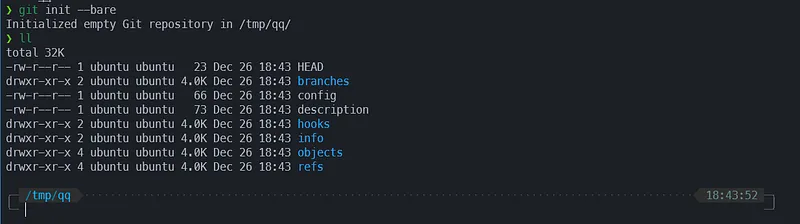
git init --bare file structure
You can look more into the --bare option to understand it even better.
Ref: https://www.atlassian.com/git/tutorials/setting-up-a-repository/git-init
Now that we know how to setup a repository on server we can create an endpoint which will let us create new repository.
Code for such an endpoint could look like below. Here I have stripped out the various check I implemented before actually creating a repository.
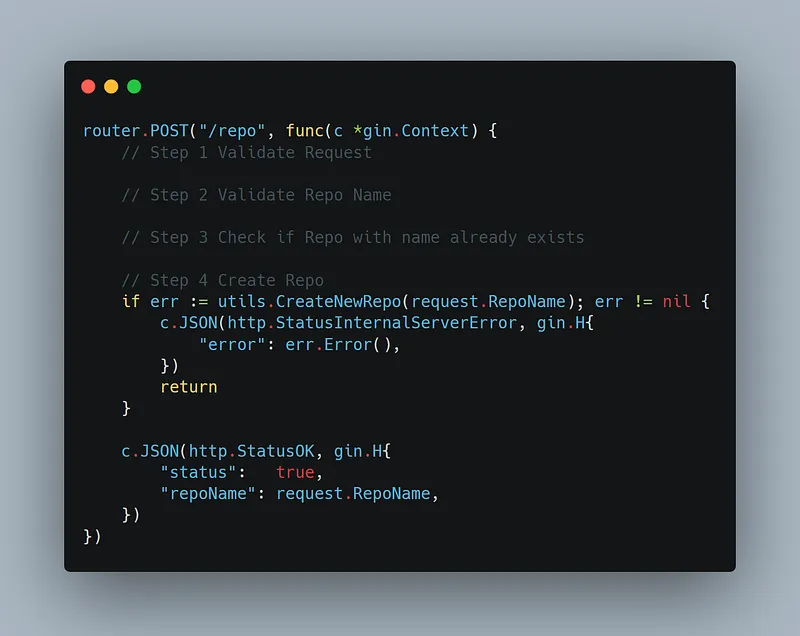
Create Repository HTTP Route
I created a small utils package which I used to handle all git specific operations. Code for the CreateNewRepo function used in above snippet is below.
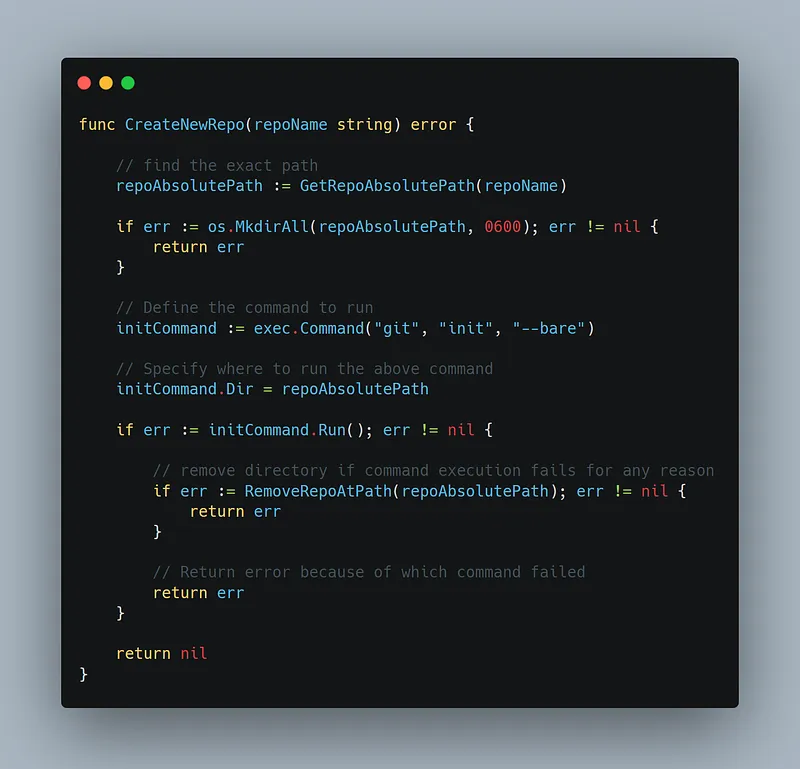
We now have a endpoint set-up which when hit will create a new repository for us.
Now let’s implement the main git operations.
Implementing Git Operations support
When we do git clone git push git pull on our terminal if the remote repository URL is HTTP based git internally uses HTTP as the mode to perform the required operations for these commands to work.
This is a key piece of information as all we need to do now is make sure our server support all the endpoints git will use and also handle the response and request for these endpoints.
Luckily there are already tools/libraries which does this and we won’t need to implement them from scratch.
For my project in Go I came across this project https://github.com/asim/git-http-backend/blob/master/server/server.go
The author of this project had already implemented all the necessary endpoints and the core functionality for each of them using go’s default HTTP server as the base.
Since I was using Gin I had to tweak the code to make it work specific to Gin framework, which was comparatively easy as all the Handler function needed was Request & Response .
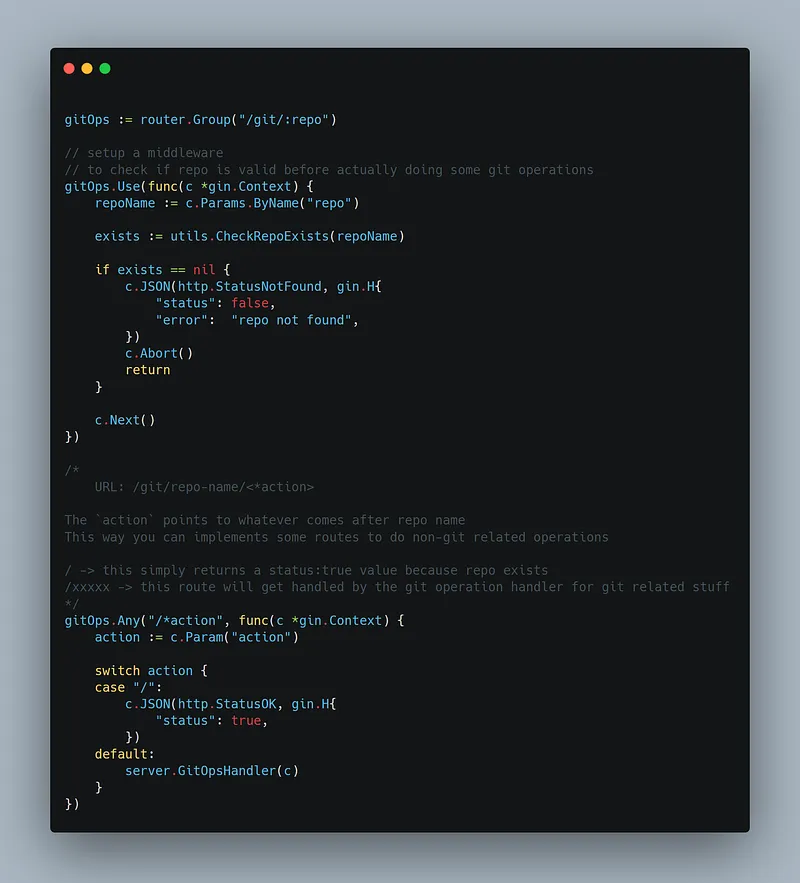
That’s it.
We now have the required endpoints created and we can now take our code for a spin.
Let’s Execute
Let’s say if your server was running on port 8000 and you had created a repo named test .
In your local terminal you could do git clone http://localhost:8000/git/test and it would clone the repository (it would be blank if you hadn’t pushed anything).
You can now do git commit and push the changes, the changes would now be present on your remote repository.
References:
To read more in-depth about git I’d recommend the official docs (for in-depth)/Atlassian’s version (for brief intro)
Some more in-depth resources below:
Git - pack-protocol Documentation
Next Steps
Git Hooks based events
I modified my server to setup a WebSocket connection on a route which looks like http://localhost:8000/ws/repo-name/ . This would now create a per repo based WebSocket connection between the clients and our server.
I could then use this connection to push various information to clients.
An example of such use-case is below:
Together with Git hooks (post-receive) I can now push messages on the WebSocket Connection to the clients whenever a new commit/ref is updated on the remote repository.
This would allow me to setup a front-end in future which can listen to these events and show a message to the user.
You can read more about the Git hooks here
For making the above feature you would need to setup Server Side Hooks.
Authentication
To implement basic authentication where a different user can not push to another user’s repository you can use the pre-receive git hook on server side and add the authentication logic and block the operations if access is denied. (There may be other ways to implement this feature this is something I thought of and haven’t implemented yet.)
This is my first-time writing a blog post, feedback is appreciated.
Thanks.